Nginx 反向代理

摘要:。


目录

[TOC]

NginX 反向代理服务器

Nginx 是一款轻量级的 Web 服务器、反向代理服务器、及电子邮件(IMAP/POP3)代理服务器。

  • Nginx 作为整个架构的流量入口,可以理解为一个外部的网关,承担着请求的路由转发、负载均衡、动静分离、解决跨域等功能。
  • 要采用多节点部署,同时通过keepalived来实现高可用,从而保障整个平台的高可用。
  • 工作在七层应用层,默认80端口。
  • 特点是占有内存少,并发能力强(能够经受高负载的考验,有报告表明能支持高达 50000 个并发连接数)。
正向代理、反向代理

(正向)代理:即是客户端代理,代理客户端,服务端不知道实际发起请求的客户端。隐藏了真实的请求客户端。

  1. 访问原来无法访问的资源,如google;
  2. 可以做缓存,加速访问资源;
  3. 对客户端访问授权,上网进行认证;
  4. 代理可以记录用户访问记录(上网行为管理),对外隐藏用户信息。

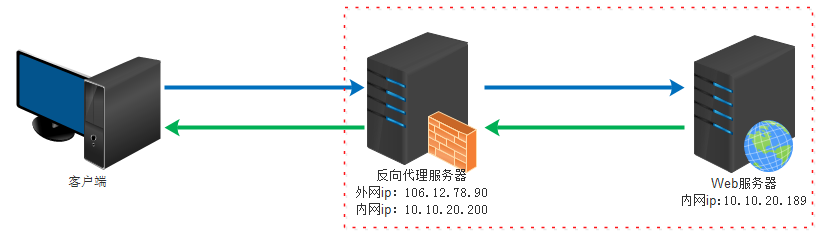
反向代理:即是服务端代理,代理服务端(真实目标服务器),客户端不知道(访问的)实际提供服务的是哪台服务器。隐藏了真实的服务端。

  • 原理:实际运行方式是,客户端只需将请求发送给反向代理服务器,由反向代理服务器去选择(内部网络上的)目标服务器,将请求转发并获取数据,再返回给客户端。
  • 此时反向代理服务器和目标服务器对外就像是同一个服务器,对外暴露的是反向代理服务器地址,隐藏了真实服务器 IP 地址。
  • 客户端不直接请求源服务器,因此源服务器不需要外部 IP 地址,而反向代理需要配置内部和外部两套 IP 地址

反向代理的作用:

  1. 作为公网访问地址,保证内网(Web服务器)的安全,阻止web攻击。
  2. 负载均衡:通过反向代理服务器来优化网站的负载。
  3. 可以用来进行缓存、日志记录等。

缺点:所有请求和响应都需要经过反向代理服务器,可能会成为性能瓶颈

img

常见命令、配置文件

常用命令:

  • nginx -s reload:重启
  • nginx -s stop:关闭

文件介绍:

  • html/ 默认静态文件夹:里面一般会有一个index.html入口页和一个50x.html错误页,nginx默认配置会将80端口代理到入口页。
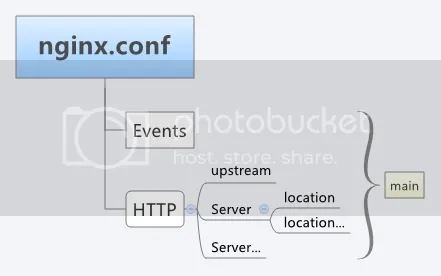
  • conf/nginx.conf 配置文件可以看做是由三个部分组成,main、events 和 http。
    1. main(全局设置):设置的指令将影响其他所有设置;
    2. server(主机设置):主要用于指定主机和端口;
    3. upstream(负载均衡服务器设置):主要用于负载均衡,设置一系列的后端服务器;
    4. location(URL匹配特定位置的设置):用于匹配网页位置。

img

http 反向代理配置
  1. proxy_pass:适用于配置反向代理,让Nginx将请求转发给后端服务器。最后请求的路径:proxy_pass指定的后端服务URL。
  2. root:适用于指定请求的根目录。最后请求的路径:root指定的URL + location上的URL。
  3. alias:则适用于将URL路径映射到文件系统路径,方便访问资源。最后请求的路径:alias指定的静态资源URL。
  • 更改 host:在 C:\Windows\System32\drivers\etc 目录下的 host 文件中添加一条 DNS 记录:
127.0.0.1 www.helloworld.com

配置文件:

1
2
3
4
5
6
7
8
9
10
11
12
13
14
15
16
17
18
19
20
21
22
23
24
25
26
27
28
29
30
31
32
33
34
35
36
37
38
39
40
41
42
43
44
45
46
47
48
49
50
51
52
53
54
55
56
57
58
59
60
61
62
63
64
65
66
67
68
69
70
71
72
73
74
#工作模式及连接数上限
events {
    worker_connections 1024;    #单个后台worker process进程的最大并发链接数
}

#设定http服务器,利用它的反向代理功能提供负载均衡支持
http {
    #类似 Kafka 中的零拷贝
    #sendfile 指令指定 nginx 是否调用 zero copy 方式来输出文件,对于普通应用,必须设为 on;
    #如果用来进行下载等应用磁盘IO重负载应用,可设置为 off,以平衡磁盘与网络I/O处理速度,降低系统的uptime.
    sendfile        on;
    #tcp_nopush     on;

    #连接超时时间
    keepalive_timeout  120;
    tcp_nodelay        on;

    #设定实际的服务器列表
    upstream zp_server1{
        server 127.0.0.1:8089;
    }

    #HTTP服务器
    server {
        #监听80端口,80端口是知名端口号,用于HTTP协议
        listen       80;
        #定义使用www.xx.com访问
        server_name  www.helloworld.com;
        
		#首页
		index index.html
		#指向webapp的目录
		root D:\Project\spring-security\src\main\webapp;
 
        #反向代理的路径(和upstream绑定),location 后面设置映射的路径
        location / {
            proxy_pass http://zp_server1;
        }

        #静态文件,nginx自己处理,代理静态文件用`root`
        location ~ ^/(images|javascript|js|css|flash|media|static)/ {
            root D:\Project\spring-security\src\main\webapp\views;
            #30天过期,静态文件不怎么更新的话,可以设大一点,如果频繁更新,则可以设置得小一点
            expires 30d;
        }

        #禁止访问 .htxxx 文件
        location ~ /\.ht {
            deny all;
        }

		#错误处理页面(可选择性配置)
		#error_page   404              /404.html;
		#error_page   500 502 503 504  /50x.html;
        #location = /50x.html {
        #    root   html;
        #}
        
        #以下是一些反向代理的配置(可选择性配置)
        #proxy_redirect off;
        proxy_set_header Host $host;
        proxy_set_header X-Real-IP $remote_addr;
        proxy_connect_timeout 90; 	#nginx跟后端服务器连接超时时间(代理连接超时)
        proxy_send_timeout 90;     	#后端服务器数据回传时间(代理发送超时)
        proxy_read_timeout 90;      #连接成功后,后端服务器响应时间(代理接收超时)
        
        #静态站点配置,前端项目的放置路径
        location / {
			root html;
			index index.html;
			#转发任何请求到 index.html
		}
    }
}
proxy_pass 反向代理路径

proxy_pass配置代理路径时,直接替换整个代理路径,包括ip地址的端口等:

  • 在匹配到location配置的URL路径后,转发请求到【proxy_pass】配置的URL。

假如要将8080端口上的请求转发至3000端口。

  • 前端请求为http://localhost:8080/get/test,暂且把/get/test称为请求部分。

proxy_pass路径后带斜杠 / 与不带的区别:

  1. 无斜杆:http://localhost:3000,proxy_pass路径会替代原本的ip和端口等,并拼接整个请求部分/get/test(包括location地址在内的完整请求地址)。等于转发去http://localhost:3000/get/test
  2. 有斜杆:http://localhost:3000/,则location路径只用于匹配、不附加上去,只附加未匹配到的部分。如:
    1. location用/get则是http://localhost:3000/+({/get}/test),等于转发去http://localhost:3000//test,报错。
    2. location用/get/则是http://localhost:3000/+({/get/}test)。也就是要都加斜杠。
1
2
3
4
5
6
7
8
9
10
11
12
13
14
15
16
17
18
19
20
21
22
23
24
# 转发 http://localhost:8080/get/test
server {
        listen 8080;
        server_name localhost;
    
 		location /get {
            proxy_pass http://localhost:3000;
        }
        #或者
        location /get/ {
            proxy_pass http://localhost:3000;
        }
        #结果都是转发去http://localhost:3000/get/test

        location /get {
            # 结果是转发去http://localhost:3000//test,出错~
            proxy_pass http://localhost:3000/;
        }
        #或者
        location /get/ {
            # 结果是转发去http://localhost:3000/test
            proxy_pass http://localhost:3000/;
        }
    }
root 和 alias 代理路径

root与alias主要区别在于nginx如何解释location后面的uri,这会使两者分别以不同的方式将请求映射到服务器文件上。

  1. root:是最上层目录的定义。处理结果是,root 路径 + location 路径(即html/home文件夹)找内容。
  2. alias:是一个目录别名的定义。使用alias路径替换location路径(匹配的部分)。处理结果是,alias 路径(即html文件夹)找内容。
    • alias后面必须要用“/”结束,否则会找不到文件。
1
2
3
4
5
6
7
8
9
10
# 即 html/home
location /home {
    root html;
    index index.html index.htm;
}
# 即 html
location /home {
    alias html;
    index index.html index.htm;
}
https 反向代理配置

使用 nginx 配置 https 需要知道几点:

  • HTTPS 的固定端口号是 443,不同于 HTTP 的 80 端口;
  • SSL 标准需要引入安全证书,所以在 nginx.conf 中需要指定证书和对应的 key;
1
2
3
4
5
6
7
8
9
10
11
12
13
14
15
16
17
18
19
20
21
22
23
24
25
#HTTPS服务器
server {
    #监听443端口。443为知名端口号,主要用于HTTPS协议
    listen       443 ssl;

    #定义使用www.xx.com访问
    server_name  www.helloworld.com;

    #ssl证书文件位置(常见证书文件格式为:crt/pem)
    ssl_certificate      cert.pem;
    #ssl证书key位置
    ssl_certificate_key  cert.key;

    #ssl配置参数(选择性配置)
    ssl_session_cache    shared:SSL:1m;
    ssl_session_timeout  5m;
    #数字签名,此处使用MD5
    ssl_ciphers  HIGH:!aNULL:!MD5;
    ssl_prefer_server_ciphers  on;

    location / {
        root   /root;
        index  index.html index.htm;
    }
}
负载均衡配置

Nginx 支持以下负载均衡算法:

  1. 轮询:请求轮流发送给应用服务器;
  2. 最少连接(权重):请求被分配给具有最少数量活动连接的服务器;
  3. ip 哈希:使用哈希函数确定请求应该选择哪一个服务器(基于客户端的 IP 地址);

在(网站域名指向的)公网 IP 所在的服务器上部署 nginx,对所有请求做负载均衡处理。

1
2
3
4
5
6
7
8
9
10
11
12
13
14
15
16
17
18
19
20
21
22
23
24
25
26
27
28
29
30
31
32
33
34
35
36
37
38
39
40
41
42
43
44
45
46
47
48
49
50
51
52
53
54
55
56
57
58
59
60
61
#nginx在监听`80`端口上的服务
listen	80;

http {
    upstream front_server{
		server www.helloworld.com:8081;
	}
    #设定负载均衡的服务器列表
    upstream user_load_balance_server {
        #weigth参数表示权值,权值越高被分配到的几率越大
        server 192.168.1.11:80   weight=6;
        server 192.168.1.12:80   weight=5;
        server 192.168.1.13:80   weight=1;
    }
    #设定负载均衡的服务器列表
    upstream product_load_balance_server {
        server 192.168.1.21:81   weight=6;
        server 192.168.1.21:82   weight=5;
        server 192.168.1.21:83   weight=1;
    }

   #HTTP服务器
   server {
		# 前端项目,默认index.html代理到了80端口
		location / {
			proxy_pass http://front_server;
        	#静态站点配置,前端项目的放置路径
			root api/dist;
			index index.html; #转发任何请求到 index.html
		}
        #1. 例如react打包的dist项目,静态文件是以`/`绝对路径的形式访问,需要单独给它们添加代理。
		#2. 比如要把它们都放在html文件夹,那就用alias。
        location /test{
            alias html;
            index index.html;
        }
        location ~ .*\.(js|css)?$ {
            root html;
        }
        
        #^~/api/表示匹配前缀是api的请求
        location  ^~/api/ {
            proxy_pass http://tomcat_list/;
        }
        #对后端所有请求进行负载均衡请求
        location /api/user {
            proxy_pass  http://user_load_balance_server; #请求转向服务器列表
            #root        /root;                 #定义服务器的默认网站根目录位置
            #index       index.html index.htm;  #定义首页索引文件的名称
        }
        #对后端所有请求进行负载均衡请求
        location /api/product {
            proxy_pass  http://product_load_balance_server; #请求转向服务器列表
            #root        /root;                 #定义服务器的默认网站根目录位置
            #index       index.html index.htm;  #定义首页索引文件的名称
        }
        
        #后端的Web服务器可以通过X-Forwarded-For获取用户真实IP
        proxy_set_header X-Forwarded-For $remote_addr;
    }
}
解决跨域问题

见计算机网络文档中。

跨域问题:

  1. 如果在一台服务器上同时启动多个 webapp 应用,不能都用 80 端口,需要分别绑定不同的端口号。
  2. 前后端分离模式下,前端和后端分别是独立的 web 应用程序,前后端在交互时势必存在跨域问题

可以通过反向代理将端口转发到默认端口。

  • Nginx 代理前端到根目录,代理 /api 到后端服务器、并进行负载均衡;
  • 实现不同端口间的转发:HTTP 默认的端口号是80,Tomcat 服务器默认配置端口是 8080,想直接访问网址而不加端口来访问 Tomcat 下部署的项目时,必须进行端口转发。(即要达到这样一个效果:直接访问www.baidu.com访问的是8080端口,而不是其80端口)

首先,在 enable-cors.conf 文件中设置 cors :

配置说明:

  • Access-Control-Allow-Origin:允许跨域的域名,* 表示允许所有域名。
  • Access-Control-Allow-Methods:允许的 HTTP 方法(如 GETPOST 等)。
  • Access-Control-Allow-Headers:允许的请求头。
  • Access-Control-Expose-Headers:允许客户端访问的响应头。
  • Access-Control-Max-Age:预检请求的缓存时间(单位:秒)。
  • OPTIONS 请求:用于处理浏览器的预检请求(Preflight Request)。
1
2
3
4
5
6
7
8
9
10
11
12
13
14
15
16
17
18
19
20
21
22
23
24
25
26
27
28
29
30
31
32
33
34
35
36
37
38
39
40
41
42
43
44
45
46
47
48
49
50
51
52
# ----------------------------------------------------
# 此文件为项目 nginx 配置片段
# 可以直接在 nginx config 中 include(推荐)
# 或者 copy 到现有 nginx 中,自行配置
# www.helloworld.com 域名需配合 dns hosts 进行配置
# 其中,api 开启了 cors,需配合本目录下另一份配置文件
# ----------------------------------------------------

# 定义允许的域名
map $http_origin $cors_origin {
    default "";
    "~^https://example.com$" $http_origin;
    "~^https://another.com$" $http_origin;
}

upstream front_server{
  server www.helloworld.com:9000;
}
upstream backend_api_server{
  server www.helloworld.com:8080;
}

server {
  listen       80;
  server_name  www.helloworld.com;

  location ~ ^/api/ {
        # 动态设置允许的域名
        add_header 'Access-Control-Allow-Origin' $cors_origin;
        add_header 'Access-Control-Allow-Methods' 'GET, POST, OPTIONS';
        add_header 'Access-Control-Allow-Headers' 'DNT,User-Agent,X-Requested-With,If-Modified-Since,Cache-Control,Content-Type,Range';
        add_header 'Access-Control-Expose-Headers' 'Content-Length,Content-Range';
		add_header 'Access-Control-Allow-Credentials' 'true';

        # 处理 OPTIONS 预检请求
        if ($request_method = 'OPTIONS') {
            add_header 'Access-Control-Max-Age' 1728000;
            add_header 'Content-Type' 'text/plain; charset=utf-8';
            add_header 'Content-Length' 0;
            return 204;
        }

        # 其他配置
        proxy_pass http://backend_api_server;
        #rewrite "^/api/(.*)$" /$1 break;
  }

    # 前端
  	location ~ ^/ {
    	proxy_pass http://front_server;
  }
}
动静分离

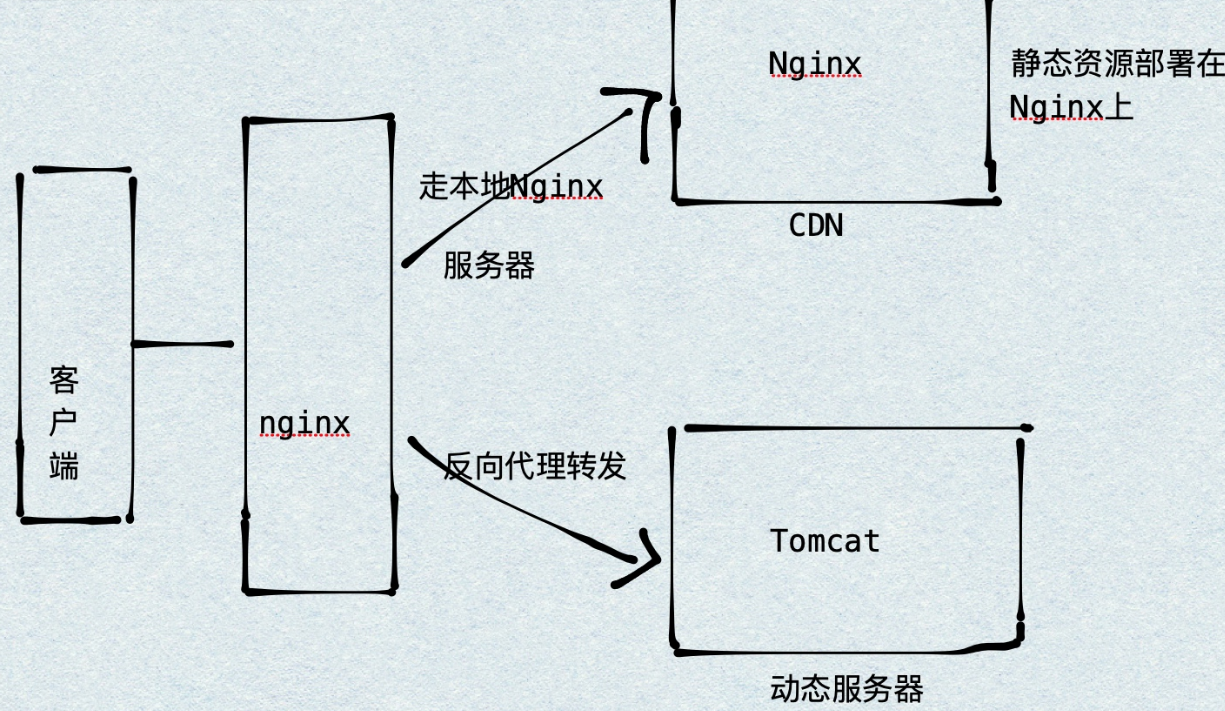
动静分离:简单来说就是把动态请求和静态请求分开、动态文件与静态文件的分离。

  • 静态请求直接就可以通过 Nginx 处理,动态请求转发到后台交由 Tomcat 进行处理。
  • 可以提高用户访问静态代码的速度,降低对后台应用访问,减轻服务器的压力。

img

静态站点配置

举例来说:如果所有的静态资源都放在了 /app/dist 目录下,只需要指定首页以及这个站点的 host 即可。

  • 添加 HOST:127.0.0.1 static.zp.cn

此时,在本地浏览器访问 static.zp.cn ,就可以访问静态站点了。

搭建文件服务器
1
2
3
4
5
6
7
8
9
10
11
12
autoindex on; # 开启可以显示目录,默认不开启
autoindex_exact_size on;# 显示文件大小
autoindex_localtime on;	# 显示文件的修改时间

server {
    charset      utf-8,gbk; # windows 服务器下设置后,依然乱码,暂时无解
    listen       9050 default_server;
    listen       [::]:9050 default_server;
    server_name  _;
    root         /share/fs; # 用来设置开放为文件服务的根路径
}

0%